Draft Documentation
This page is currently under development. Content may be incomplete or subject to change.
Traceability#
Traceability is the foundation of systems engineering excellence. It ensures that every requirement has a clear path through design, implementation, and verification. In SysGit, traceability is not an afterthought added through external tools—it's built directly into the model, version-controlled alongside your requirements, and visualized through multiple complementary views.
Understanding Traceability#
What is Traceability?#
Traceability is the ability to describe and follow the relationships between requirements and other system elements throughout the development lifecycle. It answers critical questions:
- Upstream traceability: Where did this requirement come from? What customer need or regulatory standard does it address?
- Downstream traceability: How is this requirement satisfied? Which parts implement it? How is it verified?
- Horizontal traceability: How do requirements relate to each other? Which requirements depend on others?
In aerospace and defense programs, traceability is not optional—it's a compliance requirement. Certification authorities, program reviews, and customer audits all demand clear evidence that requirements have been properly flowed down, allocated, and verified.
Why Traceability Matters#
Compliance and Certification: Regulatory bodies (FAA, DO-178C, MIL-STD-498) require documented traceability from requirements through verification. SysGit creates this audit trail automatically.
Change Impact Analysis: When a requirement changes, traceability shows exactly what downstream elements are affected—which parts need redesign, which tests need updating, which interfaces are impacted.
Verification Coverage: Traceability reveals gaps in your verification strategy. If a requirement has no verification link, you know immediately that coverage is incomplete.
System Integration: As subsystems from multiple vendors come together, traceability ensures nothing falls through the cracks. Every requirement must trace to responsible parties.
Knowledge Transfer: When new team members join or when conducting design reviews, traceability provides the roadmap to understand how the system works and why decisions were made.
Types of Traces in SysGit#
SysGit supports multiple relationship types aligned with systems engineering practice:
Derivation: Shows how requirements decompose from high-level needs into detailed specifications - Customer requirement → System requirement → Subsystem requirement → Component requirement - Documents the refinement and decomposition process
Satisfaction: Links requirements to the system elements that fulfill them - Requirement → Part definition that implements the requirement - Shows how design satisfies specifications
Allocation: Assigns requirements to specific system parts or subsystems - Requirement → Specific part instance responsible for meeting it - Used for requirement flowdown and responsibility assignment
Verification: Connects requirements to validation activities - Requirement → Verification activity that proves compliance - Ensures every requirement has a validation plan
Traceability in the Requirements Table#
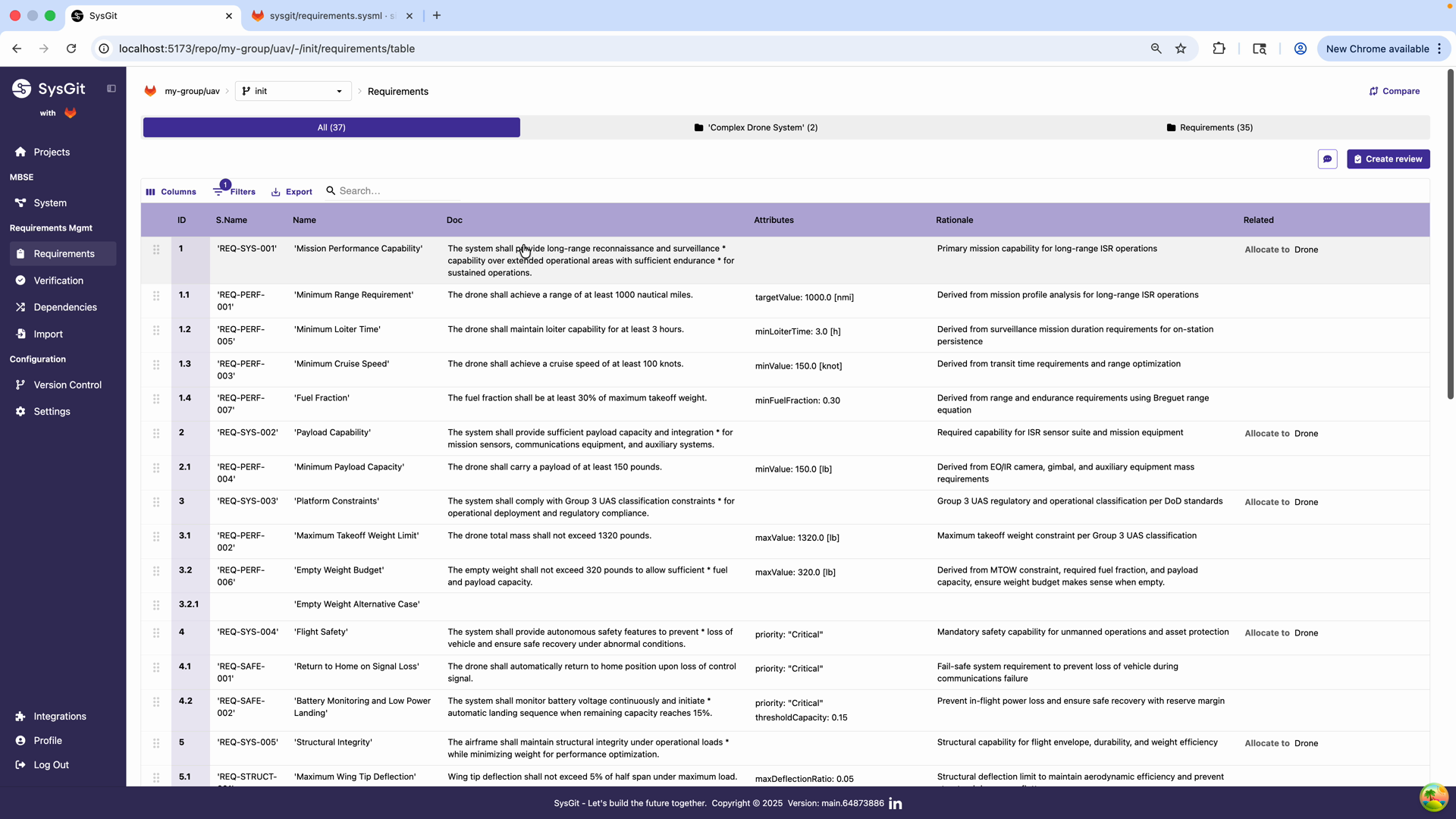
The Requirements Table provides the most direct interface for managing traceability. The Related column shows all relationships for each requirement, making it easy to see at a glance which requirements have been allocated, which are satisfied, and which may need attention.
Viewing Relationships#
In the table view, the Related column displays: - The relationship type (e.g., "Allocate to", "Satisfy by") - The target element name - A clickable link to navigate to that element
For complex models, requirements may have multiple relationships displayed in a single cell. Each relationship is shown on its own line within the cell, making it easy to see the complete traceability picture.
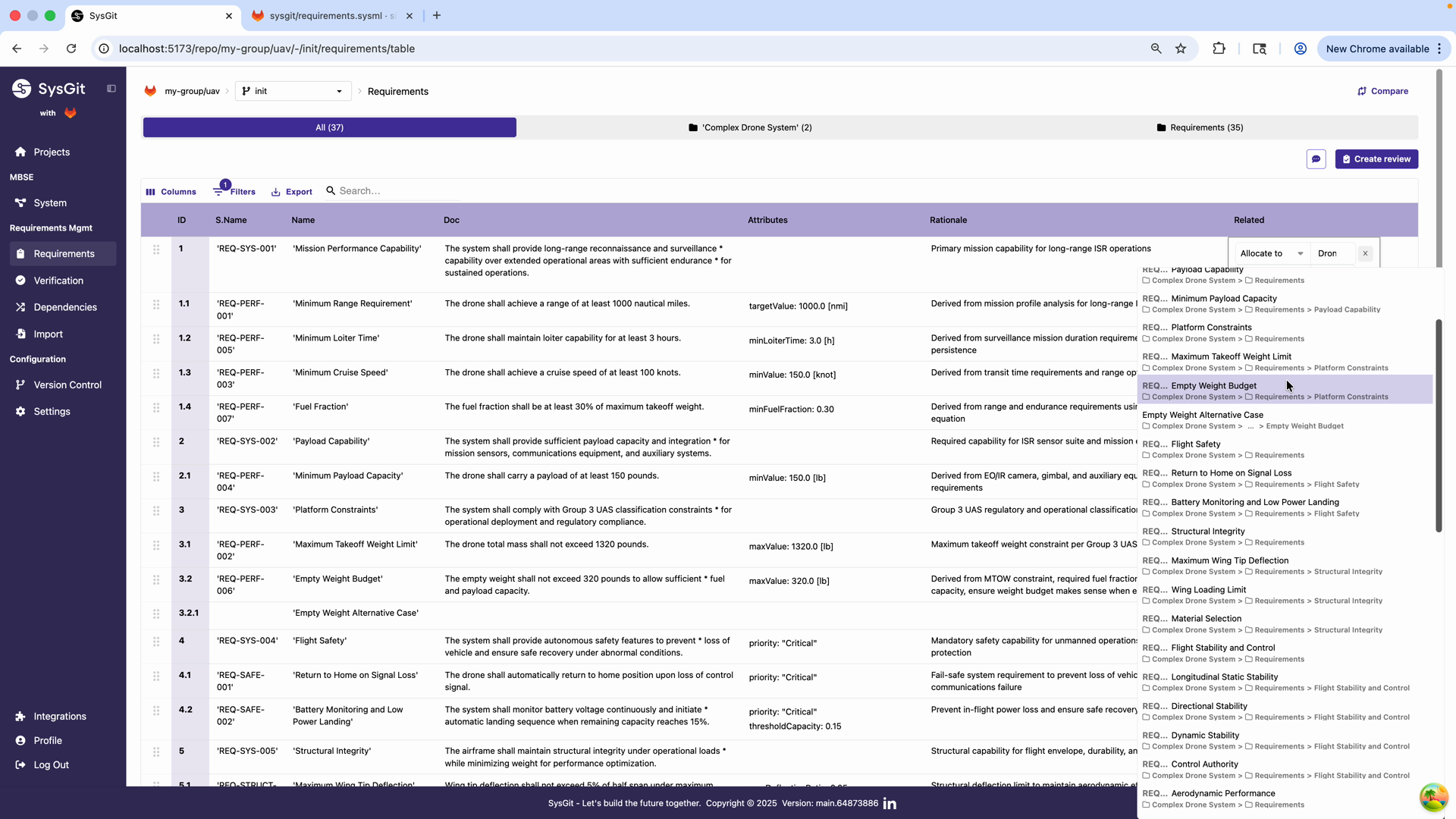
The Related column can display the full hierarchical path to each related element, showing the complete context. For example, a requirement might show:
Allocate to 'Complex Drone System' → Requirements → Platform Constraints
This breadcrumb-style display helps you understand not just what a requirement is related to, but where that element lives in the overall model structure.
Creating Relationships#
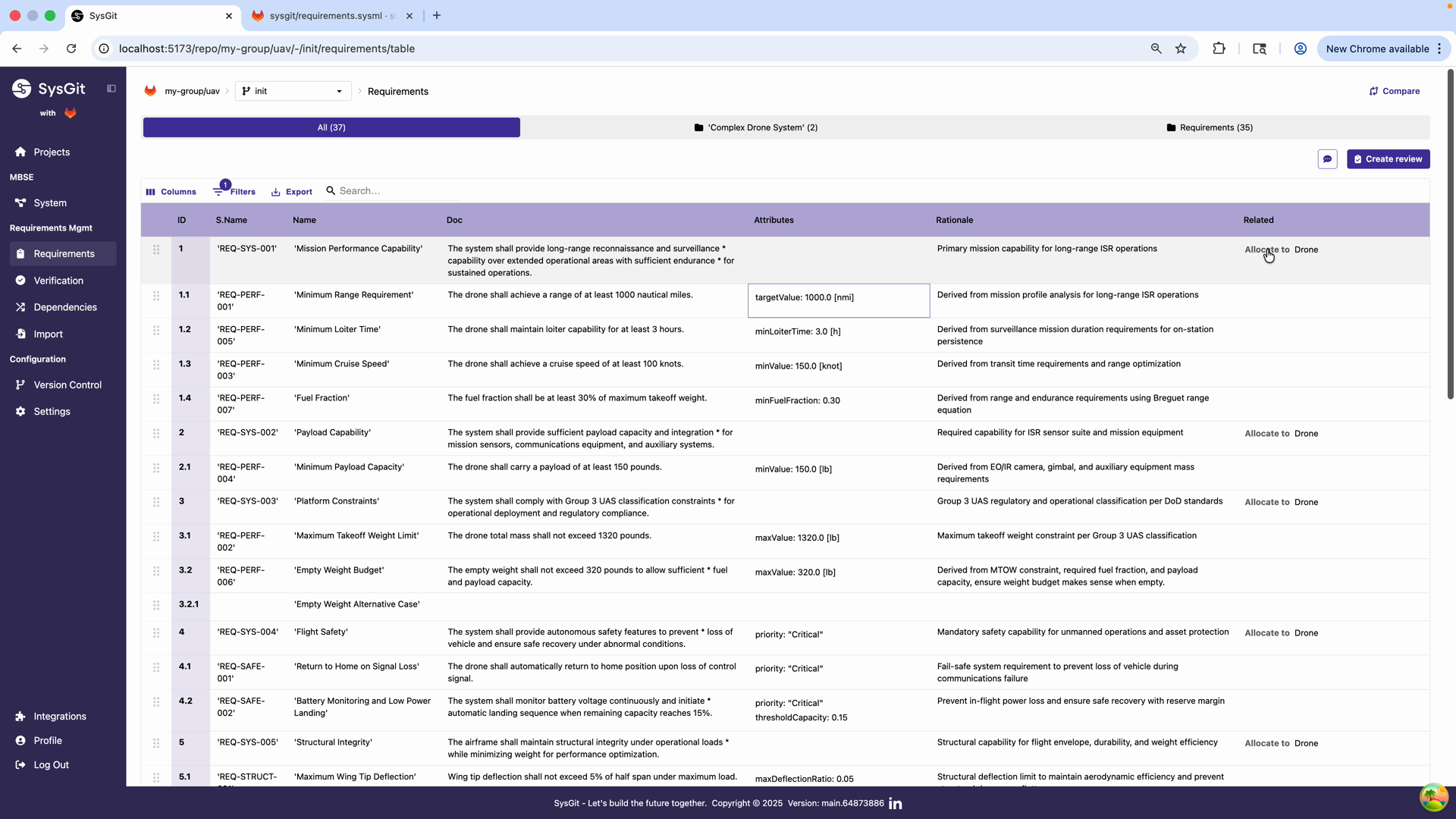
To establish a new relationship:
- Click in the Related column for the requirement
- A relationship editor opens with a dropdown showing available relationship types
- Select the relationship type (Allocate to, Satisfy by, Derive from, etc.)
- Choose the target element from the model
- The relationship is established and displayed immediately
This workflow makes it fast to establish traceability during requirements development. You can rapidly allocate requirements to parts, link derived requirements to their parents, or connect requirements to verifications—all without leaving the table view.
Editing Relationships#
Relationships are not set in stone. To modify or remove a relationship: - Click on the existing relationship in the Related column - Edit the target element or relationship type - Or remove the relationship entirely
All changes are tracked in version control, maintaining a complete history of how traceability evolved throughout the program.
Custom Dependency Matrices#
While the Requirements Table is excellent for working with individual requirements, the Dependency Matrix provides a bird's-eye view of traceability across the entire model. This matrix visualization is particularly powerful for understanding patterns, identifying gaps, and communicating system architecture.
Understanding the Matrix View#
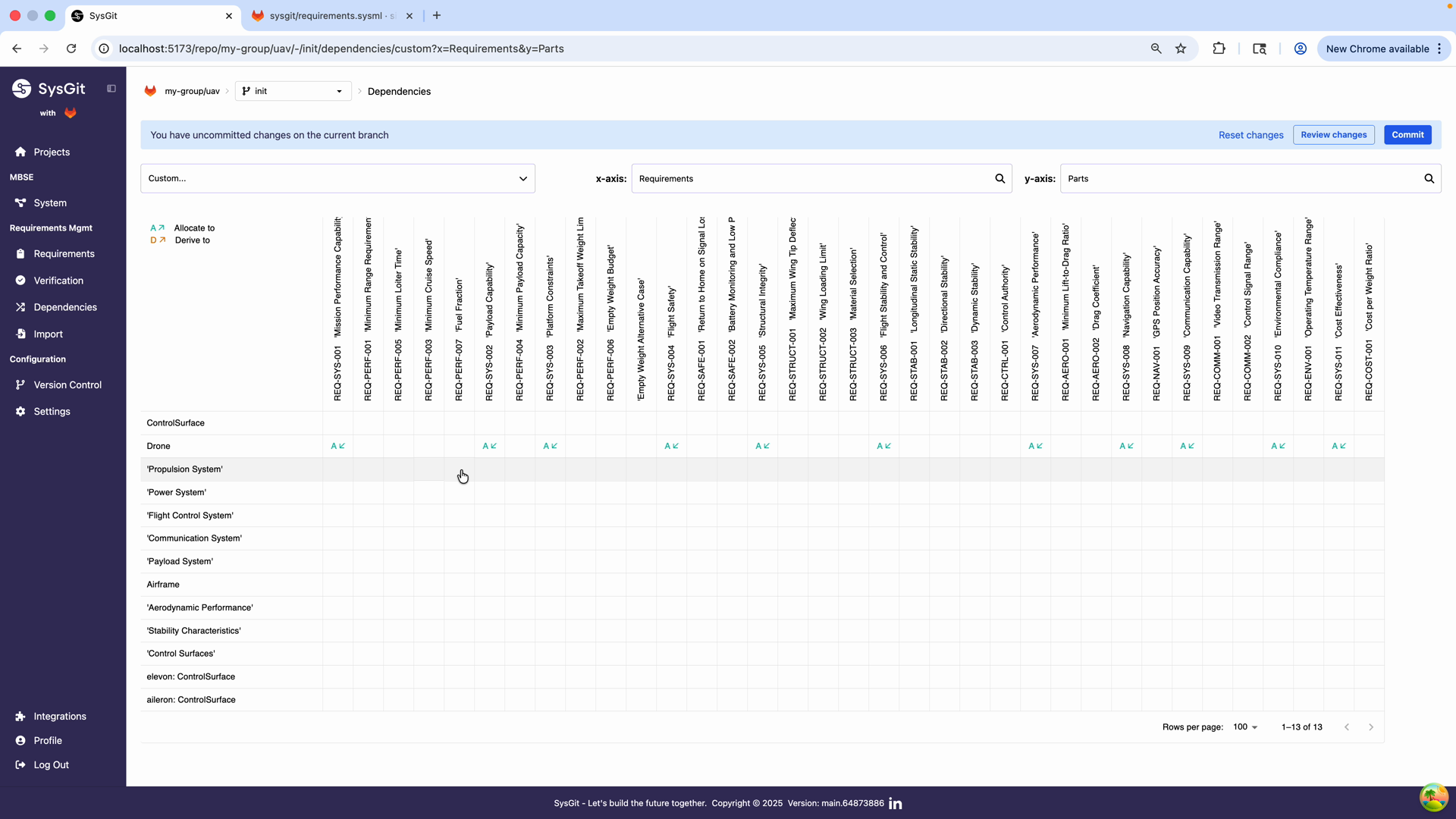
Navigate to the Dependencies section from the left navigation panel. The matrix view allows you to configure custom matrices showing relationships between any two types of model elements.
The matrix displays: - Rows: One type of model element (e.g., system parts) - Columns: Another type of model element (e.g., requirements) - Cells: Relationship indicators at the intersection
Configuring a Custom Matrix#
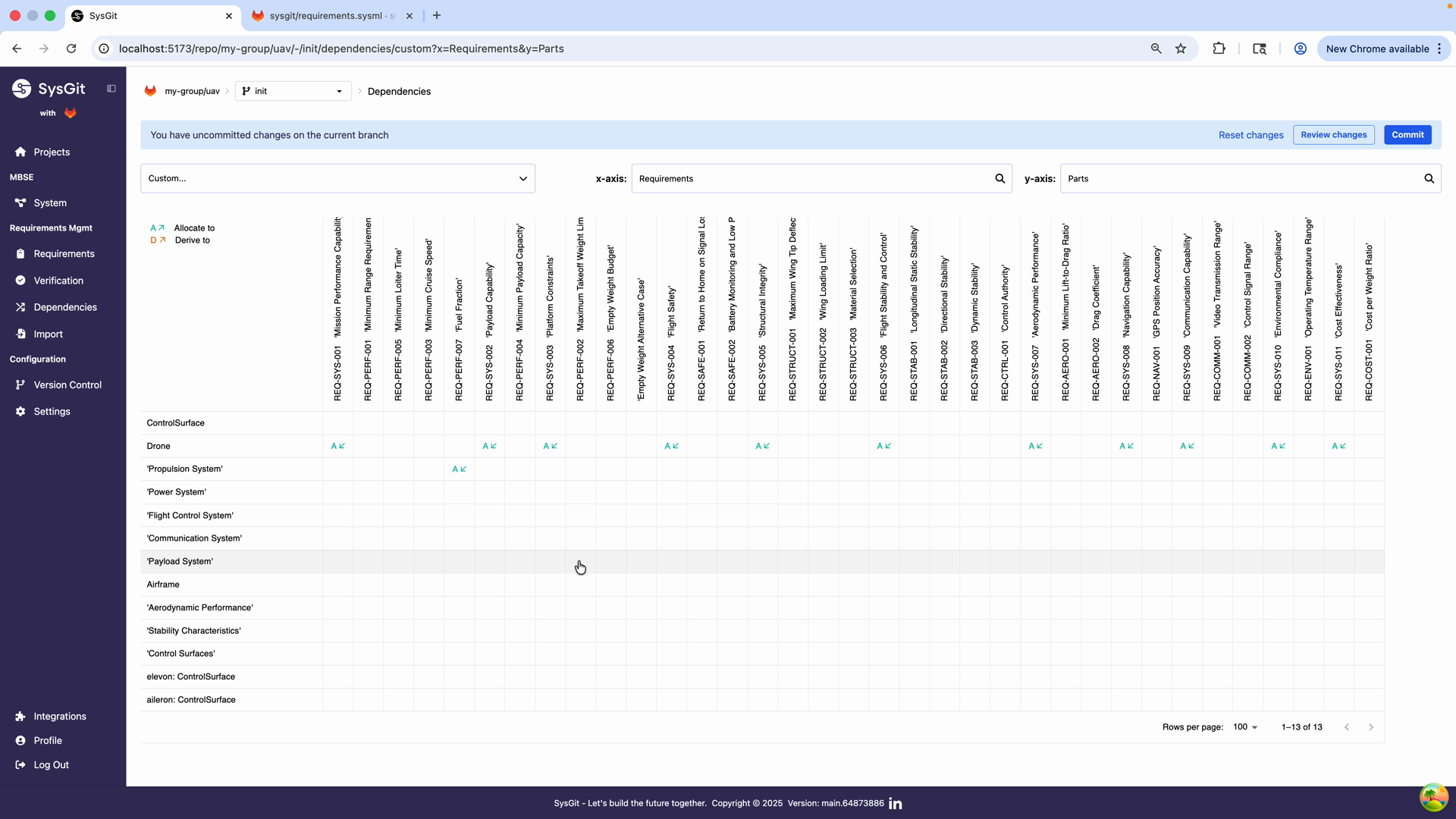
To create a Requirements-to-Parts allocation matrix:
- Click the view selector dropdown at the top of the Dependencies page
- Select "Custom..." to create a new matrix view
- Configure the axes:
- X-axis (columns): Select "Requirements" to show all requirements
- Y-axis (rows): Select "Parts" to show the physical architecture
- The matrix generates automatically showing all intersections
The legend at the bottom shows relationship types: - A << indicates an "Allocate to" relationship (read left-to-right) - D >> indicates a "Derive to" relationship - Additional symbols for other relationship types
Reading the Matrix#
The matrix provides immediate insights into your system architecture:
Vertical patterns (columns): Looking down a column shows which parts implement a specific requirement. Multiple markers in one column indicate a requirement allocated to multiple parts—often a sign of an interface requirement or cross-cutting concern.
Horizontal patterns (rows): Looking across a row shows which requirements are allocated to a specific part. This helps understand the workload and responsibility assigned to each subsystem.
Empty cells: White cells with no markers indicate no relationship. This could be appropriate, or it could indicate gaps in your allocation strategy.
Dense areas: Clusters of relationships often indicate core subsystems with many responsibilities. These areas may warrant additional scrutiny or decomposition.
In the drone example shown, you can see: - The top-level Drone part has allocations for multiple high-level requirements - Subsystems like Propulsion System, Power System, and Flight Control System each have their own set of allocated requirements - Lower-level parts like individual control surfaces have more focused allocations
Establishing Relationships in the Matrix#
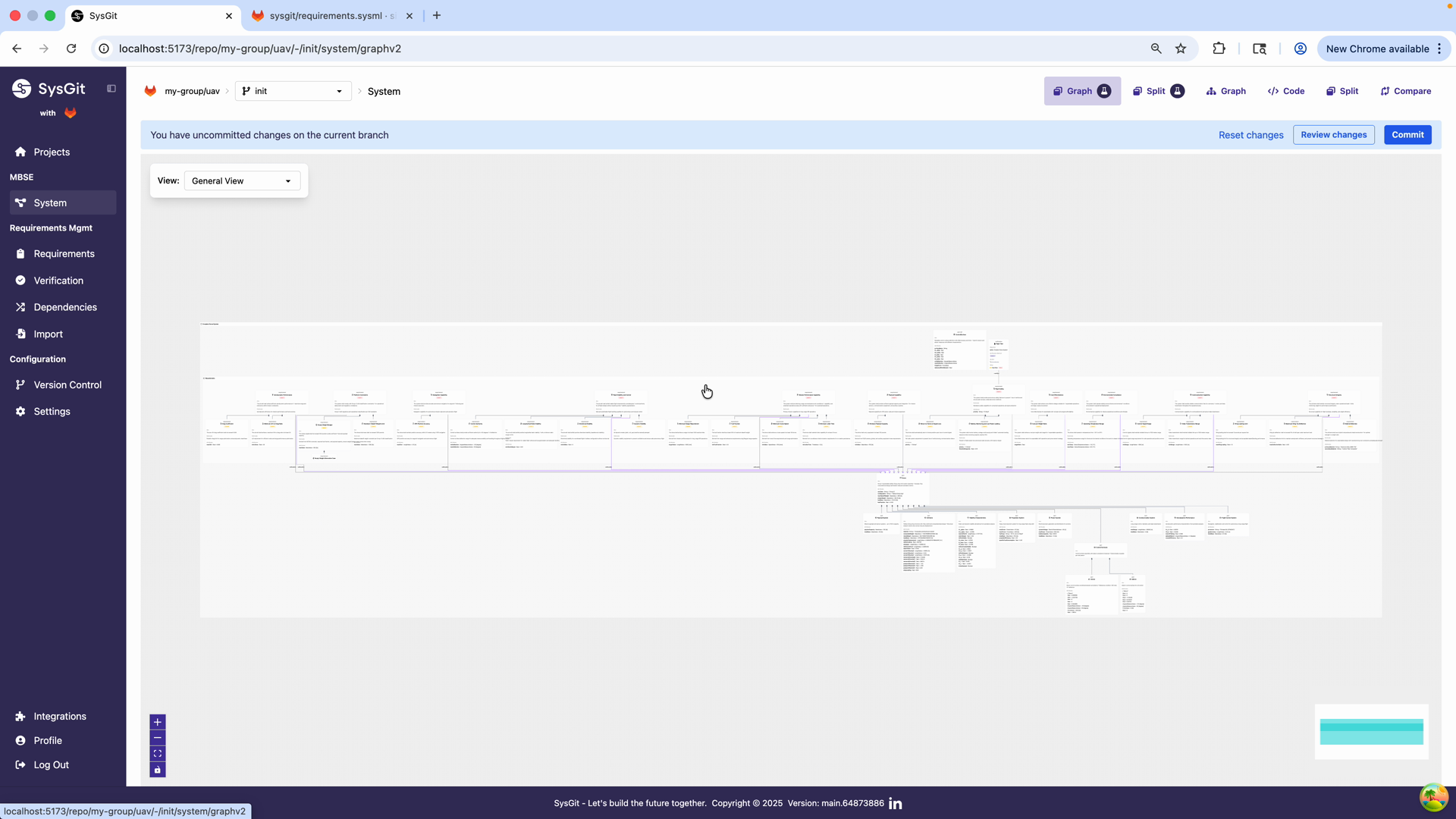
The Dependency Matrix isn't just for viewing—it's an efficient tool for creating relationships in bulk:
- Locate the requirement (column) and part (row) you want to connect
- Right-click on the intersection cell
- Select the relationship type from the context menu (e.g., "Allocate to")
- The marker appears immediately
This is dramatically faster than creating allocations one-by-one in other interfaces. During an allocation workshop with stakeholders, you can rapidly establish dozens of relationships while maintaining visibility into the overall pattern.
Example workflow: "Let's allocate the Fuel Fraction requirement to the Propulsion System. We'll right-click on that intersection... there. Now let's look at the Airframe requirements—Maximum Takeoff Weight Limit should be allocated there too."
The ability to see the entire allocation pattern while making changes helps ensure consistency and completeness. You're not just creating individual links—you're designing the system architecture.
Verification Traceability#
Verification traceability deserves special attention because it directly impacts your ability to demonstrate compliance. Every requirement must have at least one verification activity, and SysGit provides multiple ways to manage and visualize this critical relationship.
Verification Matrix#
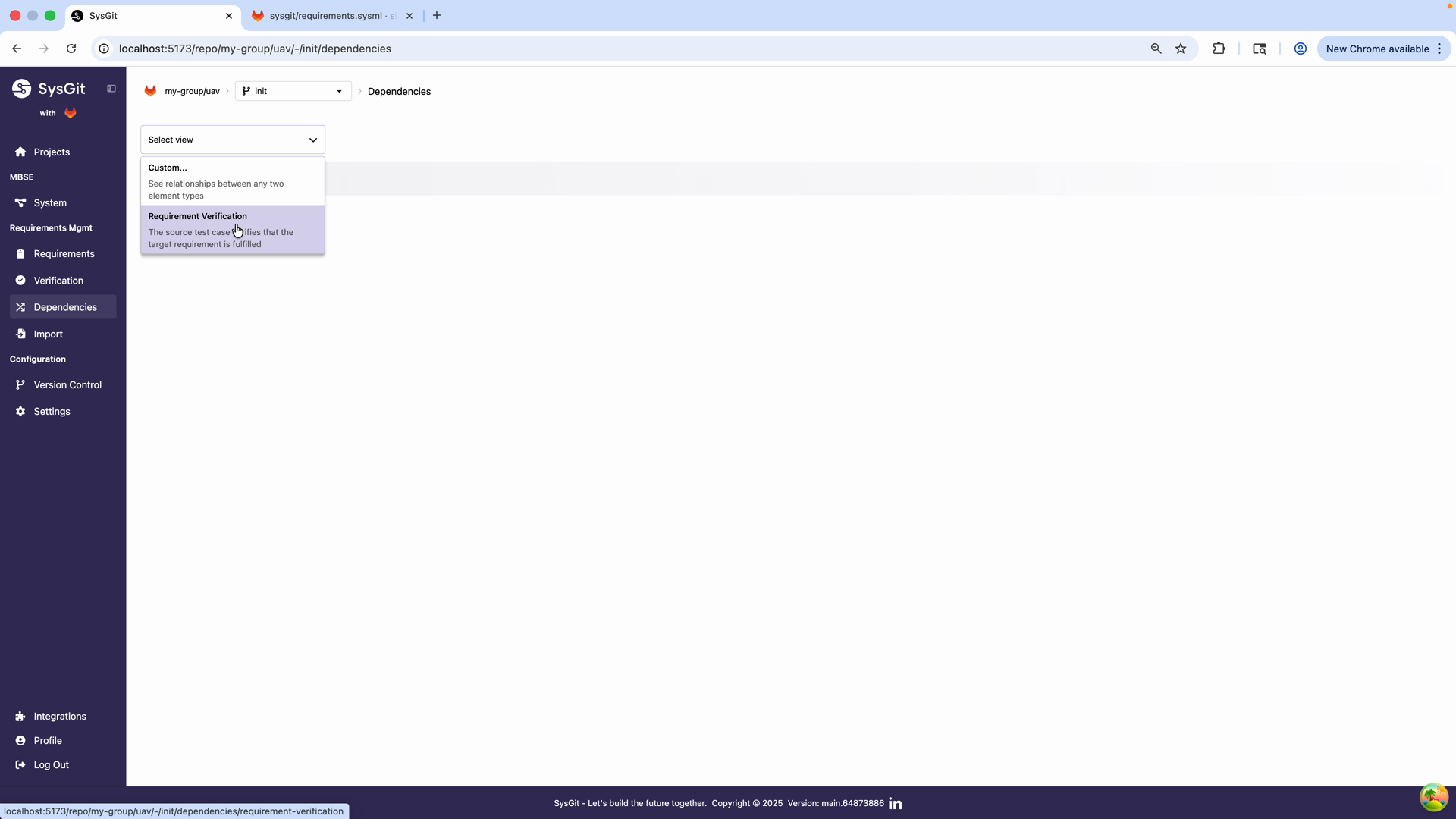
The Verification Matrix is a specialized view focused specifically on requirement-to-verification relationships. Access it by navigating to Verification in the left panel and selecting "Requirement Verification" from the dropdown.
This view displays: - All requirements (rows) - Their associated verification activities - Verification methods used - Verification status/verdict
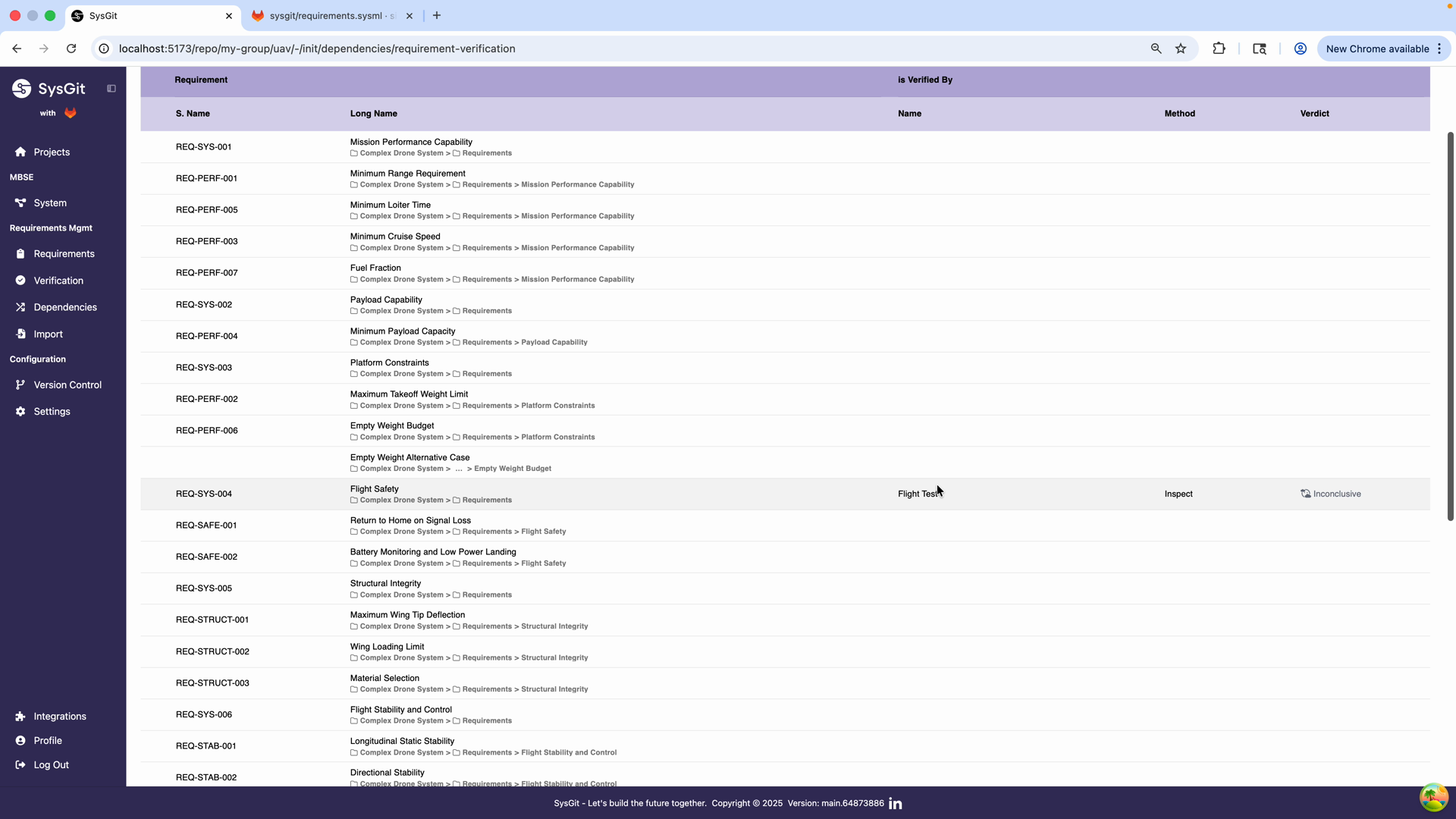
The matrix shows key verification information:
Requirement S.Name: Short identifier for quick reference (e.g., REQ-SYS-004)
Requirement Long Name: Full hierarchical path to the requirement showing its location in the model structure
Is Verified By Name: The name of the verification activity linking to this requirement
Method: The verification method being used: - Test: Physical or functional testing - Inspect: Visual inspection or examination - Analyze: Mathematical or computational analysis - Demo: Operational demonstration
Verdict: Current verification status: - Pass: Requirement successfully verified - Fail: Verification unsuccessful, requirement not met - Inconclusive: Results ambiguous or incomplete - Not Executed: Verification not yet performed
Gap Analysis#
One of the most valuable uses of the Verification Matrix is identifying gaps in your verification strategy. Requirements without verification activities represent risk—you have no plan to validate those requirements.
In the example matrix shown, most requirements show no verification activity yet. This is common in early program phases. As the program matures, every row should have at least one verification linked. Empty rows in later phases indicate verification gaps that must be addressed.
Best practice: Review the Verification Matrix regularly during program execution:
- Early phases: Ensure verification approach is defined for all requirements
- Design phases: Confirm verification activities are detailed and scheduled
- Implementation phases: Track verification execution progress
- Verification phases: Monitor verdicts and address failures
Bidirectional Visibility#
Verification traceability is bidirectional—you can navigate in either direction:
From requirement to verification: In the Requirements Table, the Related column shows which verifications validate each requirement. Click the link to view verification details.
From verification to requirement: In the Verification Table (covered in Verification Management), the Verifies column shows which requirements each verification addresses. Click the link to view requirement details.
This bidirectional linking ensures consistency. If you update a verification to address additional requirements, those requirements automatically show the verification link. No manual synchronization needed.
Graph View for Visual Traceability#
The Graph View provides a visual, network-based representation of traceability relationships. This view is particularly effective for presentations, design reviews, and understanding local neighborhoods of relationships.
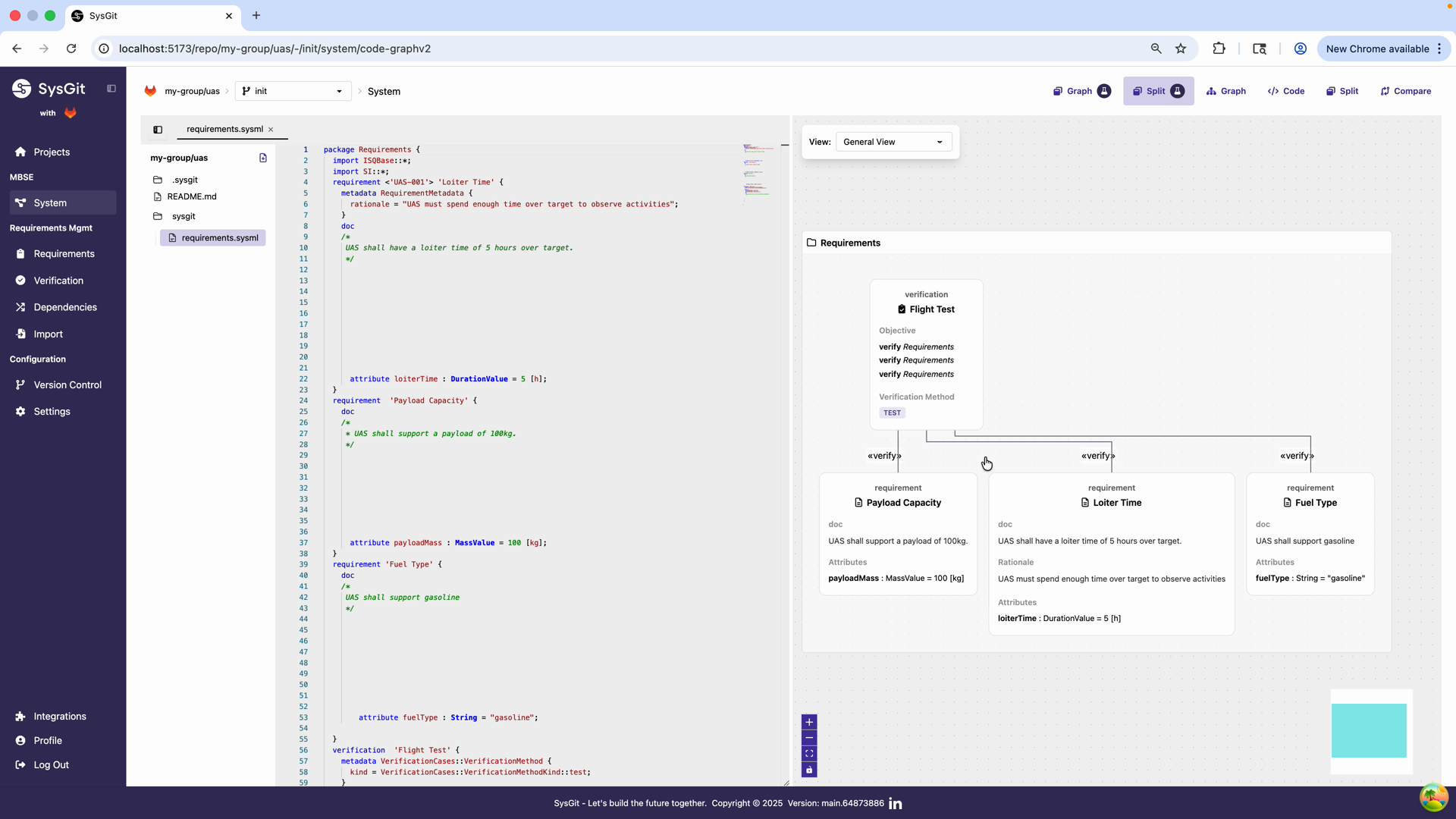
In the Graph View: - Requirements appear as nodes with their documentation visible - Verifications appear as separate nodes - Relationships are shown as labeled edges connecting nodes - Colors and shapes distinguish different element types
Navigating Relationships Visually#
The graph makes relationship patterns immediately apparent:
- Requirements with many outgoing edges are highly connected (either well-allocated or possibly over-constrained)
- Requirements with no edges may need attention
- Verification nodes show their coverage at a glance
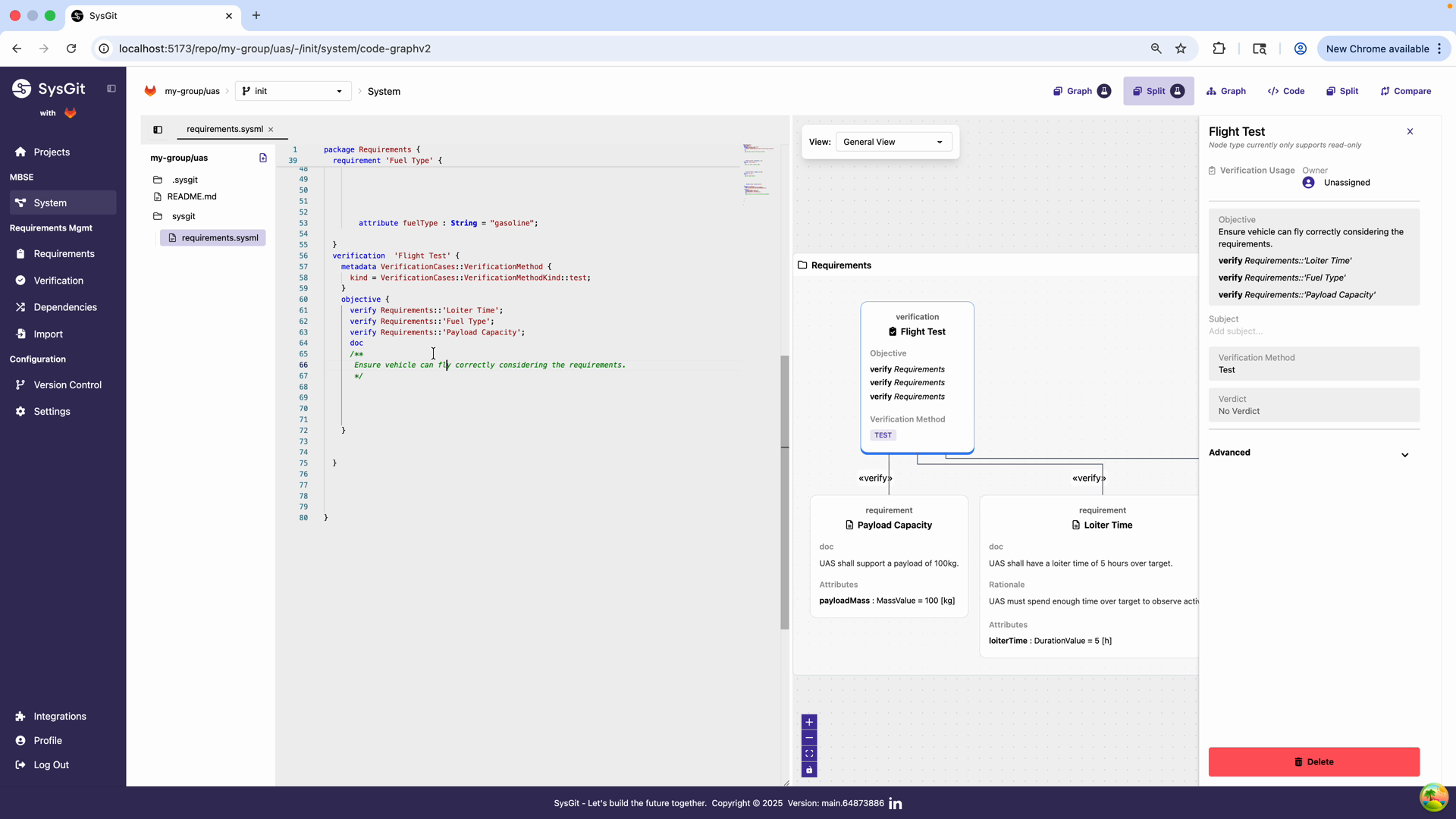
When you click on a verification node, the graph highlights all connected requirements. In this example, the "Flight Test" verification connects to three requirements: Payload Capacity, Loiter Time, and Fuel Type. The "verify" relationship is clearly labeled on each edge.
This visual representation is invaluable for:
- Design reviews: Project the graph to show stakeholders how verification is structured
- Gap identification: Quickly spot requirements with no verification edges
- Consolidation opportunities: See if multiple verifications are redundantly covering the same requirements
- Communication: Non-technical stakeholders can understand relationships without reading tables
Graph Filtering and Focus#
The graph can be filtered to show specific subsets:
- Filter by package to focus on a subsystem
- Filter by relationship type to show only allocations, only verifications, etc.
- Collapse/expand nested elements to control detail level
- Zoom and pan to navigate large models
These controls make the graph useful even for large, complex models that would be overwhelming if displayed in full.
Version Control and Change Review#
One of SysGit's most powerful features for traceability is the ability to review relationship changes as part of your normal Git workflow.
Code-Level Change Review#
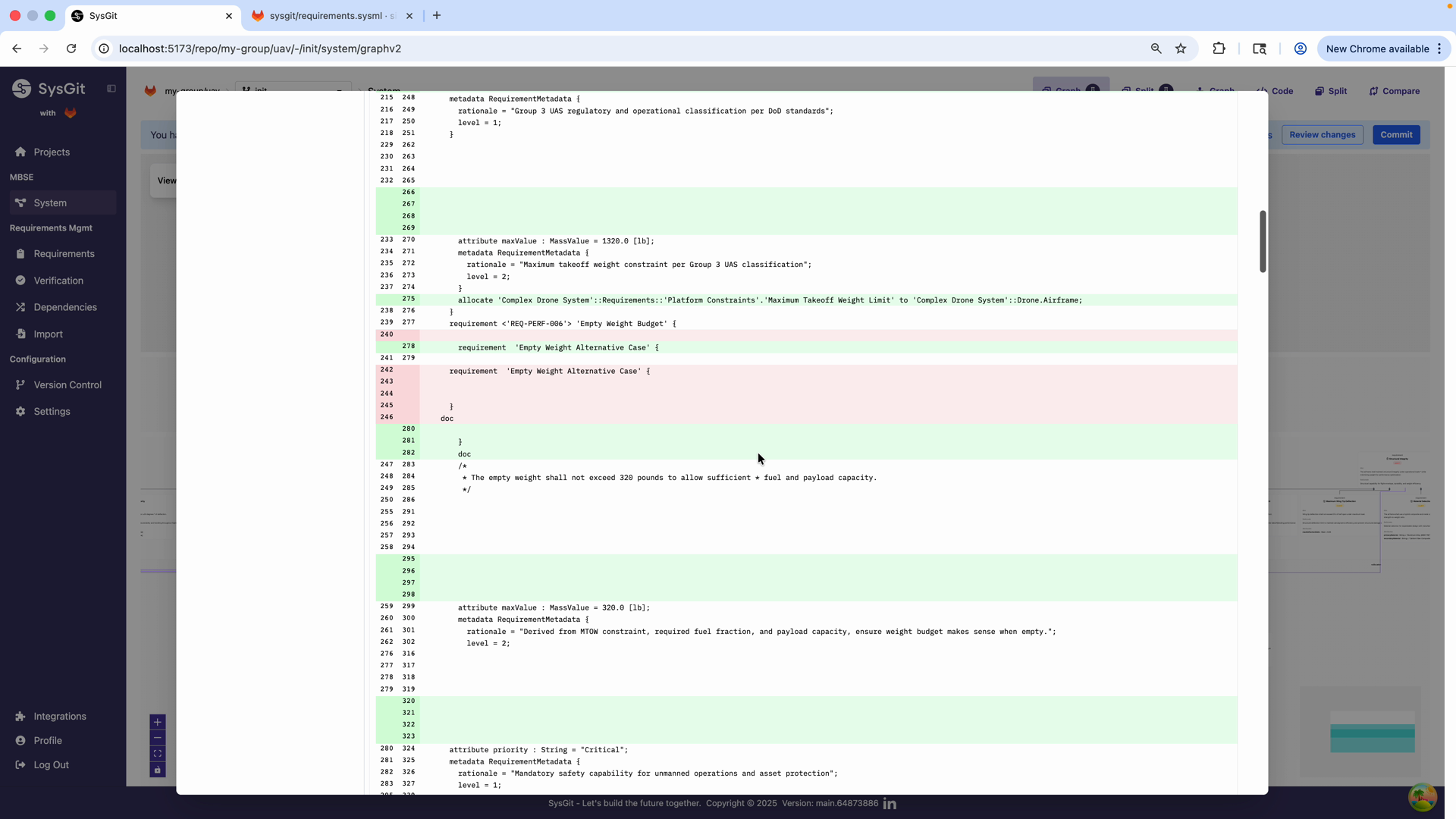
When you commit changes to relationships, SysGit's diff view highlights the modifications in the underlying SysML v2 code. Lines with relationship changes are marked in green (additions) or red (deletions).
In the example shown, you can see:
- Line 233: New attribute definition added
- Line 237: Allocation relationship established
- Line 241: New requirement definition created
This code-level visibility is essential for:
- Technical review: Senior engineers can verify relationships are correctly structured
- Merge conflicts: Understanding the exact nature of conflicting changes when multiple engineers work simultaneously
- Audit compliance: Regulators can inspect the exact changes made to traceability
Table-Level Change Review#
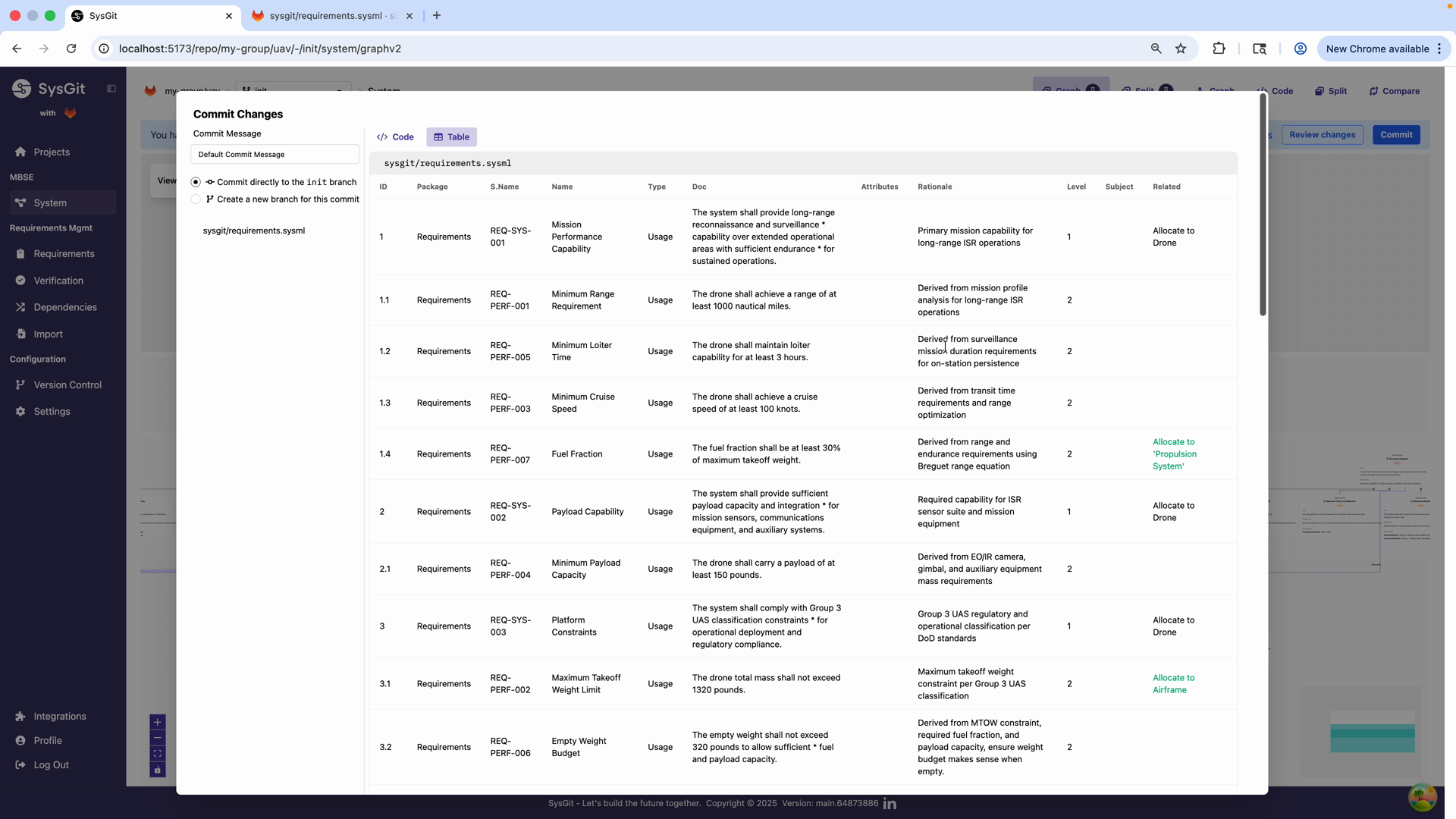
SysGit also provides table-based change review for stakeholders less familiar with SysML syntax. Click the Table tab in the commit dialog to see modified requirements in familiar tabular format.
The table view highlights changes: - New allocations appear in teal/green highlighting - Modified attributes are shown with updated values - Removed relationships would appear with red highlighting
Example: The table shows that REQ-PERF-007 (Fuel Fraction) now has a new allocation: "Allocate to 'Propulsion System'". Similarly, REQ-PERF-002 (Maximum Takeoff Weight Limit) now allocates to 'Airframe'.
This dual-mode change review means:
- Systems engineers can work in tables and see changes in tables
- Model architects can review in code
- Program managers can review in either format
- Customer reviews can use the most accessible format
No other MBSE tool provides this capability. Most require understanding modeling syntax to review changes. SysGit makes model changes accessible to everyone on the team.
Impact Analysis and Change Propagation#
Traceability's primary value emerges when requirements change. Instead of wondering what's affected, traceability makes the impact explicit and visible.
Understanding Downstream Impacts#
When a requirement changes:
- Identify direct relationships: What elements directly reference this requirement?
- Follow transitive relationships: What elements reference those elements?
- Assess verification impact: Do verification activities need updating?
- Evaluate interface impact: If this requirement allocated to multiple parts, are interfaces affected?
SysGit's graph and matrix views make this impact analysis straightforward. Simply locate the changed requirement and follow the relationship edges to see what's affected.
Change Propagation Workflow#
Example scenario: A customer requests increasing the loiter time requirement from 5 hours to 8 hours.
- Locate the requirement: Find "Loiter Time" in the Requirements Table
- Check allocations: Review the Related column—it's allocated to the Power System
- Review verifications: Check the Verification Matrix—it's verified by "Endurance Flight Test"
- Check dependencies: Use the Graph View to see if other requirements depend on loiter time
-
Impact assessment:
- Power System: May need larger battery capacity
- Endurance Flight Test: Must run 8 hours instead of 5
- Weight budget: Additional battery mass affects other requirements
- Propulsion: Longer operation time may affect fuel consumption requirements
-
Create change branch: Use Git branching to explore the change impact without affecting the main model
- Update affected elements: Modify derived requirements, update verification plans, adjust part specifications
- Review as team: Use pull request workflow to review all changes together
- Commit with linked issue: Reference the change request in the commit message
This workflow—only possible with version-controlled traceability—ensures changes are managed systematically rather than ad-hoc.
Traceability Reports#
While SysGit provides interactive views for working with traceability, teams often need to generate reports for reviews, audits, or deliverables:
Verification Coverage Report: Export the Verification Matrix to show which requirements have verification coverage and which don't
Allocation Report: Export the Requirements-to-Parts matrix to show requirement flowdown through the architecture
Change Impact Report: Use Git diff tools to show what changed in response to a requirement modification
Derivation Tree: Document the requirement decomposition hierarchy showing how customer requirements flow to detailed specifications
These reports support program reviews, customer deliverables, and certification submissions.
Best Practices for Traceability#
Establish Relationships Early#
Don't wait until late in the program to establish traceability. Create relationships as you develop requirements:
- When deriving a requirement, immediately link it to its parent
- When allocating a requirement to a part, establish that allocation right away
- When creating a verification, link it to the requirements it addresses
Early traceability establishment prevents "traceability debt" where large amounts of work must be done retroactively.
Be Consistent with Relationship Types#
Use relationship types consistently across your model:
- Allocate to: Assign requirements to parts responsible for fulfilling them
- Satisfy by: Show that a part design satisfies a requirement
- Derive from: Connect refined requirements to their sources
- Verify: Link verifications to requirements they validate
Inconsistent relationship usage makes models harder to understand and reduces the value of automated analysis.
Maintain Complete Coverage#
Aim for complete traceability coverage:
- Every requirement should have at least one verification
- Every requirement should be allocated to at least one part (or explicitly marked as non-allocatable)
- Every derived requirement should trace to its parent
Use the matrix views to identify and address coverage gaps systematically.
Review Traceability Regularly#
Make traceability review part of your regular workflows:
- Weekly: Team reviews verification coverage and allocation completeness
- Milestone reviews: Present matrix views to show system architecture and verification strategy
- Change control board: Use traceability to assess impact of proposed changes
Regular reviews keep traceability current and prevent degradation over time.
Leverage Version Control#
Use Git's power to manage traceability evolution:
- Branch for traceability experiments: Try different allocation strategies without affecting the main model
- Review traceability changes in pull requests: Ensure relationship changes are reviewed like code changes
- Tag traceability baselines: Mark formal traceability snapshots for audits
- Revert bad traceability decisions: If an allocation strategy doesn't work, revert to a previous state
Git makes traceability a living part of your development process, not a static document.
Use Matrix Views for Stakeholder Communication#
The dependency matrix is an excellent communication tool:
- With customers: Show how their requirements propagate through your design
- With subcontractors: Demonstrate what requirements are allocated to them
- With test teams: Illustrate the verification strategy
- With management: Provide high-level view of system architecture
Export matrix views to presentations or reports for broader distribution.
Common Traceability Patterns#
Requirement Decomposition Tree#
High-level mission requirements decompose into progressively more detailed specifications:
Mission Requirement
├── System Requirement 1
│   ├── Subsystem Requirement 1.1
│   └── Subsystem Requirement 1.2
└── System Requirement 2
    ├── Subsystem Requirement 2.1
    └── Subsystem Requirement 2.2
Each level uses derivation relationships to maintain traceability. The Requirements Table can display this hierarchy with indentation, while the Graph View shows it as a tree structure.
Verification Network#
Complex requirements may require multiple verification activities:
        ┌─→ Ground Test
Requirement ─┼─→ Analysis
        └─→ Flight Test
Conversely, a single verification may validate multiple requirements. The Verification Matrix shows these many-to-many relationships clearly.
Troubleshooting Traceability#
"I can't find a requirement to allocate to"#
Problem: When trying to establish an allocation, the target requirement doesn't appear in the selection dialog.
Solution:
- Verify the requirement exists (check the Requirements Table or Graph View)
- Confirm you're looking in the correct package
- Check that you're trying to establish the correct relationship type
- Use the search function to find the requirement by name
"The matrix shows unexpected relationships"#
Problem: The Dependency Matrix displays relationships you don't remember creating.
Solution:
- Click on the cell to see relationship details
- Use Git history to see when the relationship was created and by whom
- Review the code view to see the exact relationship syntax
- Relationships may be inherited from parent elements in the hierarchy
"Verification coverage seems incomplete"#
Problem: The Verification Matrix shows many requirements without verification links.
Solution:
- This may be expected in early program phases
- Use the matrix to prioritize which requirements need verification planning first
- Consider consolidating verifications—one verification can verify multiple requirements
- Export the matrix to track verification planning progress over time
"Changes aren't appearing in the matrix"#
Problem: You've established a relationship but it's not showing in the matrix view.
Solution:
- Refresh the matrix view (may require navigating away and back)
- Verify the relationship was committed (check for uncommitted changes banner)
- Confirm you're viewing the correct matrix axes for that relationship type
- Check that filters aren't hiding the relationship
See Also#
- Requirements Management: Creating requirements that participate in traceability relationships
- Verification Management: Creating verifications and establishing verification traceability
- System Modeling: Defining parts and allocating requirements to system architecture
- SysML v2 Language Reference: Syntax for relationship types and navigation
- Direct SysML v2 editing for complex traceability structures