CI/CD Overview#
Digital Thread Concept#
SysGit takes a unique and open approach to what other tools might consider a "digital thread" capability. Rather than building proprietary automation frameworks, SysGit leverages the well-established CI/CD infrastructure that the software engineering world has been using successfully for decades.
By storing system models as SysML v2 plaintext in Git repositories, SysGit enables the same automation patterns that software teams use for continuous integration and deployment. All changes flow through Git commits, triggering automated workflows that can validate models, update verification data, generate reports, and integrate with external test systems.
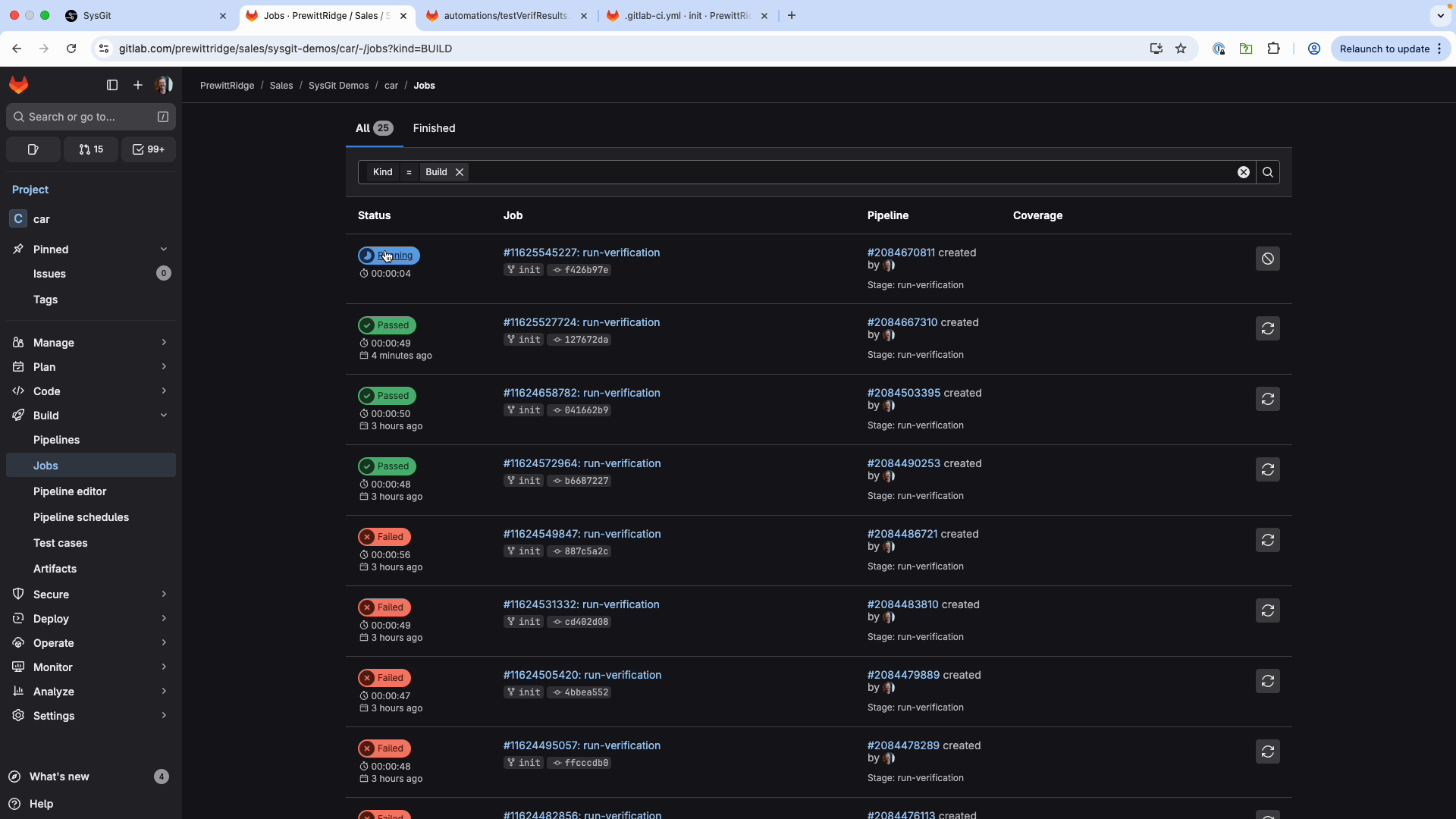 GitLab automatically triggers pipelines when changes are committed to the repository
Key Capabilities#
SysGit provides three main approaches to CI/CD integration:
- Python Object Model - Programmatic access to SysML v2 models using familiar Python syntax
- Standalone CI/CD Tool - Command-line executable for parsing and updating SysML files
- GitLab Runners - Pre-configured Docker containers for automated execution
Post-Cloud Advantage#
The Post-Cloud architecture means organizations can use existing CI/CD infrastructure (GitLab CI/CD, GitHub Actions, Jenkins) rather than adopting proprietary automation frameworks. Benefits include:
- Leverage existing infrastructure investments
- Use familiar workflows and tooling
- Reduce vendor lock-in
- Maintain complete audit trails through Git
- Enable custom automation without special APIs
Python Object Model#
The sysgit-py library allows users to interact with SysML v2 models using familiar Python syntax. Models can be modified by individual users in Jupyter notebooks or embedded into CI/CD infrastructure using custom scripts.
Getting Started#
For SysGit Sandbox users: Click "Jupyter" in the interface to access the Python library with example notebooks.
For internal users: Install directly from Git:
pip install git+<REPOSITORY_URL>
For external users: Contact your sales representative for access credentials.
Basic Usage#
The fundamental workflow involves reading a SysML v2 file, operating on the model, and writing it back:
import sysgit as sg

# Read the SysML file
model = sg.read("requirements.sysml")

# Query elements
requirements = model.select(sg.RequirementUsage, exclude_anon=True)
verifications = model.select(sg.VerificationCaseUsage)

# Modify elements
for v in verifications:
    v["verdict"].value = "VerdictKind::pass"

# Write changes
model.write("requirements.sysml", overwrite=True)
Common Use Cases#
- Automated test integration: Update verification verdicts based on test execution results
- Batch operations: Apply changes across multiple model elements simultaneously
- Data extraction: Generate reports and analytics from model data
- Model validation: Check consistency, naming conventions, and completeness
- Multi-source aggregation: Combine data from multiple tools into unified models
For comprehensive Python ORM documentation, refer to the Python Object Model Guide.
Standalone CI/CD Tool#
The standalone sysgit executable can parse SysML v2 files and extract/update tool execution data without requiring the full Python library.
Basic Usage#
Parse a SysML file to extract tool execution information:
sysgit <file>.sysml
This creates a .json file containing parsed information from ToolExecution and ToolVariable elements.
Updating Output Variables#
To update an output variable in the SysML file:
- Add a
sysmlVariableRefentry tooutputVariablesin the JSON file - Run the update command:
sysgit <file>.sysml -u <updatedJson>.json
This approach is useful for lightweight integrations where the full Python library isn't needed.
GitLab CI/CD Integration#
Pipeline Architecture#
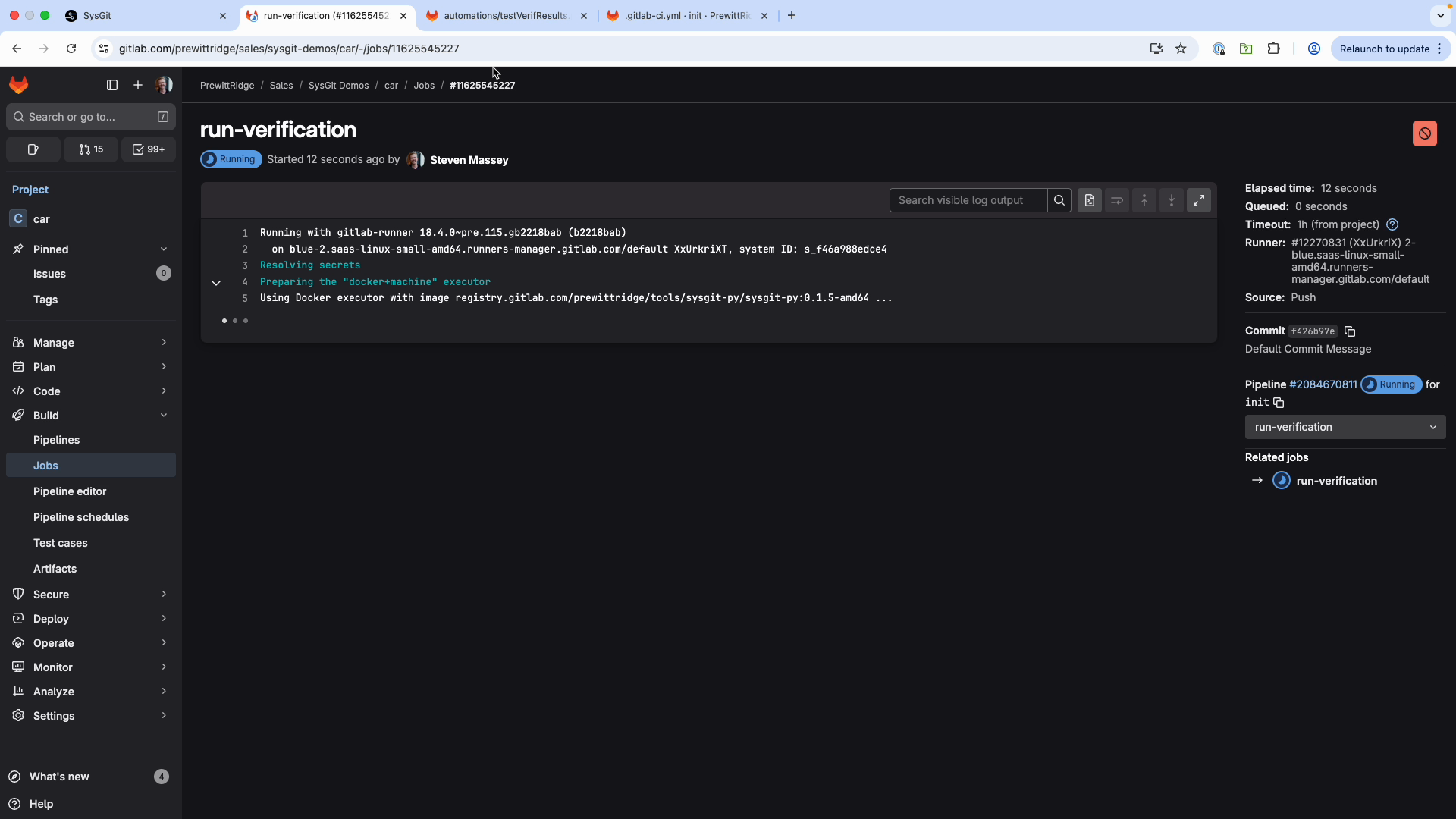 GitLab Runner console showing real-time execution of automation scripts
The typical GitLab CI/CD workflow for SysGit:
- Developer commits changes to Git repository
- GitLab webhook triggers pipeline execution
- GitLab Runner pulls pre-configured Docker image with
sysgit-py - Custom Python script executes (reads model, makes changes, writes back)
- Runner commits updated model back to repository
- User refreshes SysGit interface to see updated data
Repository Structure#
Your Git repository should follow this structure:
your-repo/
├── sysgit/
│   └── requirements.sysml          # SysML v2 model files
├── automations/
│   ├── requirements.txt            # Python dependencies
│   └── update_verifications.py     # Automation scripts
└── .gitlab-ci.yml                  # Pipeline configuration
Basic Pipeline Configuration#
Create .gitlab-ci.yml in your repository root:
stages:
  - run-verification

run-verification:
  stage: run-verification
  image:
    name: registry.gitlab.com/prewittridge/tools/sysgit-py/sysgit-py:0.1.5-amd64
    entrypoint: [""]
  variables:
    SYSML_FILE_PATH: "sysgit/requirements.sysml"
    AUTOMATION_SCRIPT: "update_verifications.py"
  rules:
    # Prevent infinite loops - don't run if commit is from the runner
    - if: '$CI_COMMIT_AUTHOR == "GitLab Runner <noreply@gitlab.com>"'
      when: never
    - when: always
  script:
    - git config --global --add safe.directory ${CI_PROJECT_DIR}
    - git checkout ${CI_COMMIT_REF_NAME}
    - python3 ${PWD}/automations/${AUTOMATION_SCRIPT} ${PWD}/${SYSML_FILE_PATH}
Critical rule: The CI_COMMIT_AUTHOR check prevents the pipeline from triggering itself when the runner commits changes back to the repository.
Docker Image#
The pipeline uses a Docker image with sysgit-py pre-installed. Contact your SysGit administrator for:
- Latest image version and registry URL
- Access credentials for private registries
- Custom image configurations for your environment
Pipeline Integration Options#
GitLab CI/CD#
GitLab provides the most mature integration with SysGit, including:
- Pre-built Docker images with
sysgit-pyinstalled - Example pipeline configurations
- Support for self-hosted GitLab instances
- Complete audit trail through Git commits
Best for: Organizations using GitLab for version control, especially those with on-premises GitLab installations.
GitHub Actions#
GitHub Actions can be used with SysGit by:
- Creating custom actions that install
sysgit-py - Using Docker containers similar to GitLab approach
- Triggering workflows on push or pull request events
- Running automation scripts in GitHub-hosted or self-hosted runners
Best for: Organizations standardized on GitHub, especially with GitHub Enterprise.
Jenkins#
Jenkins integration requires:
- Configuring Jenkins pipeline scripts
- Installing Python and
sysgit-pyon Jenkins agents - Setting up Git repository polling or webhooks
- Executing Python automation scripts as build steps
Best for: Organizations with existing Jenkins infrastructure and custom build pipelines.
Other CI/CD Platforms#
SysGit's approach is platform-agnostic. Any CI/CD system that can:
- Clone Git repositories
- Run Python scripts
- Commit changes back to Git
...can integrate with SysGit using the same patterns described above.
Automated Checks and Validation#
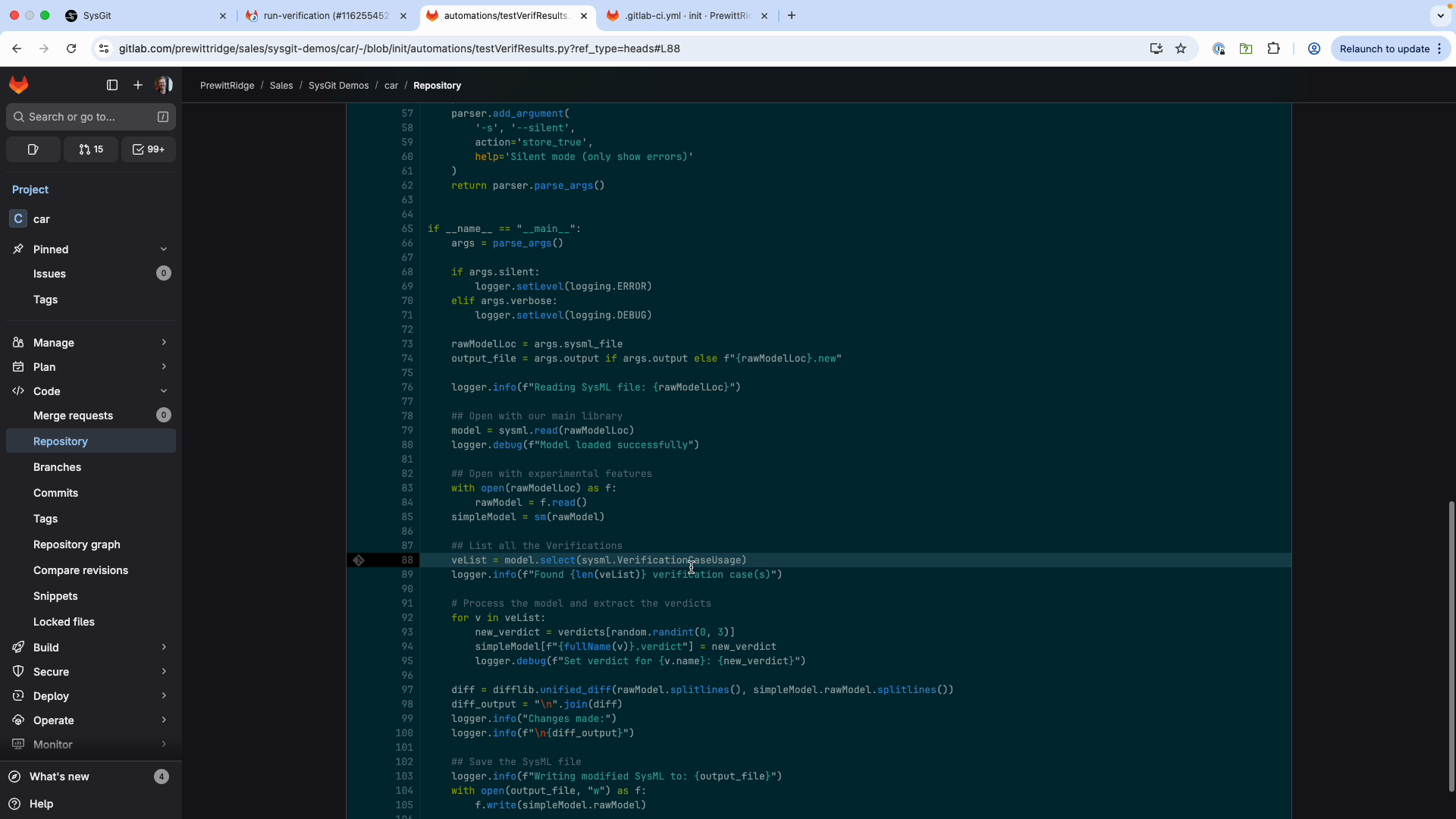 Python automation script using sysgit-py to query and update model data
Model Validation#
Use Python scripts to enforce modeling standards:
import sysgit as sg

model = sg.read("model.sysml")

# Check requirement completeness
requirements = model.select(sg.RequirementUsage, exclude_anon=True)
for req in requirements:
    if not hasattr(req, 'text') or not req.text:
        print(f"ERROR: Requirement missing text: {req.qualified_name}")

# Check naming conventions
for req in requirements:
    short_name = req.get('short_name')
    if short_name and not short_name.startswith('REQ-'):
        print(f"WARNING: Non-standard short name: {short_name}")
Traceability Gaps#
Identify requirements without verification coverage:
requirements = model.select(sg.RequirementUsage, exclude_anon=True)
verifications = model.select(sg.VerificationCaseUsage)

# Build mapping of verified requirements
verified_reqs = set()
for v in verifications:
    # Extract requirements from verify statements
    # (implementation depends on model structure)
    pass

# Find unverified requirements
unverified = [r for r in requirements if r.qualified_name not in verified_reqs]
if unverified:
    print(f"WARNING: {len(unverified)} requirements lack verification")
Compliance Checking#
Automatically validate against organizational standards:
# Check metadata completeness
for req in requirements:
    if not hasattr(req, 'metadata'):
        print(f"ERROR: Requirement missing metadata: {req.qualified_name}")
    elif not req.metadata.get('priority'):
        print(f"WARNING: Requirement missing priority: {req.qualified_name}")

# Validate against style guides
# Check for required sections, formatting, etc.
Deployment Models#
IT-Supported (On-Premises)#
In the IT-supported deployment model:
- SysGit web interface hosted on enterprise infrastructure
- GitLab instance managed by IT (on-premises or cloud)
- GitLab Runners deployed in controlled environments
- All automation executes within enterprise security boundaries
- Complete audit trail maintained through Git commit logs
This model provides centralized management and consistent security posture.
Self-Service (Client-Only)#
For self-service deployments:
- Users run automation locally using installed
sysgit-pylibrary - Jupyter notebooks for interactive development
- Manual execution of Python scripts
- Users commit results back to Git using standard Git workflows
This model enables rapid development and experimentation without IT involvement.
Workflow Example#
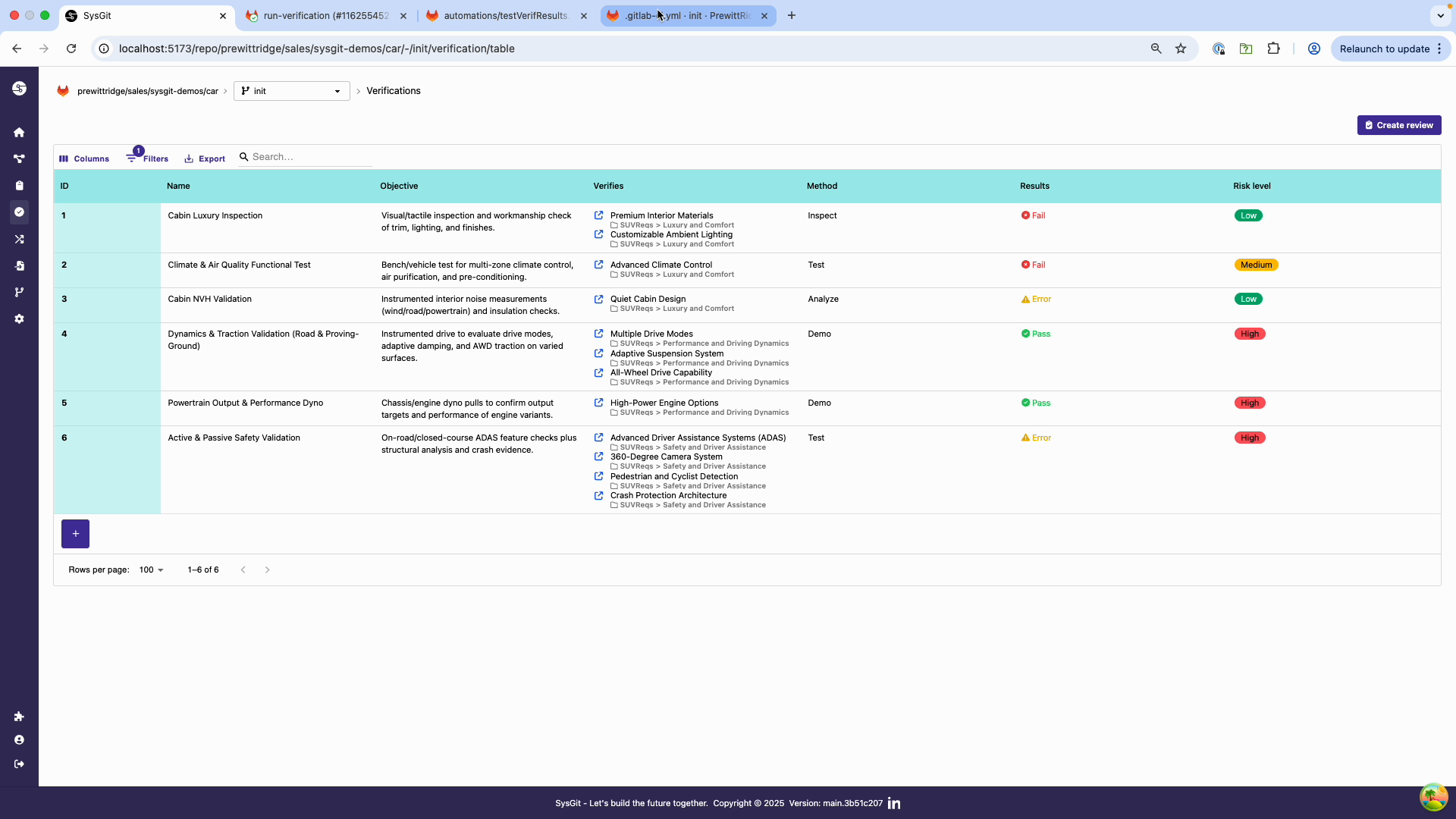 After pipeline execution, verification verdicts are automatically updated
Complete Automation Cycle#
- User makes edit: Engineer modifies a verification objective in SysGit interface
- Commit triggers pipeline: Change is committed, triggering GitLab CI/CD
- Script executes: Python automation reads model, updates verification verdicts based on test results
- Changes committed back: Runner commits updated model to Git
- User sees results: Engineer refreshes browser to see automatically updated verdicts
This cycle demonstrates treating hardware verification data as code with full automation and traceability.
Best Practices#
Script Organization#
- Store all automation scripts in
automations/directory - Use descriptive names:
update_verification_verdicts.py,validate_model.py - Version control scripts alongside models
- Include comprehensive logging for debugging
Error Handling#
Always implement robust error handling:
import sys
import logging

try:
    model = sg.read(input_file)
    # ... automation logic ...
    model.write(output_file, overwrite=True)
except FileNotFoundError:
    logging.error(f"File not found: {input_file}")
    sys.exit(1)
except Exception as e:
    logging.error(f"Automation failed: {e}")
    sys.exit(1)  # Fail the pipeline
Change Management#
- Generate diffs showing what changed
- Include descriptive commit messages
- Use
[skip ci]in commit messages when appropriate - Consider requiring code review for automation scripts
Security#
- Limit automation execution to authorized runners
- Use Git provider's access controls for script modifications
- Audit automation activities through Git commit logs
- Use separate service accounts for automation
See Also#
- Automated Verification - Integrating with test systems
- Custom Automation - Building custom scripts
- Verification Management - Manual verification workflows